Tuesday, 13 May 2014

Making a Good Powerpoint


Powerpoint has produced more bad design in its day that perhaps any other digital tool in history with the possible exception of Microsoft paint.
In this post we’re going to address the epidemic of bad presentation design with ten super practical tips for designer better looking and more professional presentations. Along the way we’ll see a number of awesome slide designs from Note & Point along with some custom examples built by yours truly. Let’s get started!

Not a Designer?

Most of the content on this site is targeted specifically towards professional designers and developers, or at the very least those interested in getting started in this field. This post however, is for everyone that has ever created a presentation. Whether you’re a student, the leader of a self-help group, or a corporate executive pulling in six figures, the second you open up Powerpoint or Keynote, you become a designer whether you like it or not.
You’ve chosen a visual tool to communicate and should therefore take the time to learn a thing or two about visual communications. One of the major reasons for this, especially for people in the professional business world, is that your colleagues will subconsciously make judgements about you based on the visual appeal of your presentation.
Follow the ten tips below and see if you don’t start getting comments about your awesome presentation design skills. Just watch out, if your co-workers notice you getting good at it they’re likely to start asking for to help with theirs!

#1 Don’t Use a Built-In Theme

To illustrate this idea I opened up Powerpoint, grabbed an actual default theme at random and threw some type on it. This workflow is nearly identical to that of countless presentation designers and the result is a typical presentation slide that I’ve seen countless times throughout college and my career.
screenshot
Here’s a design secret, this slide sucks; as do many of the default themes you’ll find in Powerpoint. Granted, they’ve definitely improved the offering in recent years and Keynote (Apple’s presentation software) has some awesome templates, but you shouldn’t view these as the go-to method but rather a last resort if you need to create a presentation in record time.
The point here is that something custom makes a much stronger statement. Your colleagues know and use the templates in Powerpoint and they’ll recognize immediately that you didn’t put any work into the aesthetics of the slides.
I know for non-designers leaving behind templates may seem a bit radical, but you can do it! Just be sure to read the other tips below before striking out on your own. Otherwise you might end up with something much worse that even the Microsoft designers could come up with (and that’s saying something).

#2 Use Quality Photography

Photography is one of the single best ways to make your presentation look awesome. It’s also one of the single best ways to make it lame. The “business people on white background” look is nice, but it’s overdone and tends to look a bit stock art-ish or flat out cliche.
Further, just because a picture is on a white background doesn’t mean it’s a good photo. Stop using ugly or awkward photography just to have something to put on the slide. Remember that no photo is better than a bad photo.


Finding Free Photos

Where are these amazing photos you say? For starters, check out Stock XCHNG, a free stock photography website with tons of content (good and bad). Also, did you know you can run a Flickr Search using only creative commons licensed content? These photos are free to use and many only require attribution, which can come in the form of a simple slide thrown in at the end of your presentation with a link to the photo sources.
 
As an example, the photo above is from Lauren Tucker, and is a Flickr Creative Commons item.

#3 Solid Colors Rock

You don’t always need a fancy photo or crazy custom background to make a presentation look professional. Using a strong palette of solid colors can make for an awesome presentation.
 
Kuler is the quintessential online color tool. Choose from thousands of awesome pre-built color schemes or generate your own with advanced but user-friendly tools.
 

Piknik

Piknik is one of the most basic color tools on the planet and definitely one of my favorites. Simply move your mouse around to change the color, scroll to change the luminosity and click to copy the values to your clipboard.
I use this daily when building websites to get a feel for what a color will look like when it covers the whole screen, which makes it perfect for presentation slides as well.
 
0to255 is another one of my favorites and is an amazing tool for finding variations of a color. This makes it perfect for hovers and borders in web design but it can also be great for finding an accent color for typography or other elements in a presentation.
 

#4 Typography Speaks Volumes

Non-designers frequently stress out about finding the proper typeface for a presentation, and for good reason. The right font can me make or break your presentation. Typography is a major art form in the design world and it can really set the stage for what you want to say.
screenshot
Remember that typefaces can communicate a mood, a point in time, or any number of other factors. Instead of browsing your font list and looking for “something cool,” instead think about the message you want to convey.
Consider the fonts below as an example of how typography can communicate just by virtue of its design. Old style serif fonts tend to fee formal and professional while sans-serif fonts feel modern and clean.
screenshot
The biggest mistake that people make with fonts in presentations is assuming that the first three font styles listed above are boring. This causes them to jump to something like the font on the bottom because it feels more unique and interesting.
If you’re not a professional designer, remember that the first three styles above aren’t boring, they’re safe. They’re great looking typefaces that have been professionally designed to make you look good and that’s exactly what they do.
Never be afraid of standard-looking fonts. Using them can help ensure that your design remains inside the realm of clean and professional and away from cluttered and ugly. Notice how the slide below uses relatively “boring” fonts but varies the size and weight to add visual interest and create something that is ultimately quite non-boring.
 

The Trick to Using Fun Fonts

Now, to take that frown off your face I will say that you don’t have to avoid cool fonts 100% of the time. There is a time and a place to throw in something fun, just know that you should use these types of fonts wisely and springily.
screenshot
As the image above illustrates, one great trick for using crazy fonts is to only implement them in a headline while leaving the rest of the text plain. When you have too much of a complicated font or start mixing complex styles, what you get is an impossible to read mess. Above we’ve left most of our messaging in a typeface that you can actually read while still bringing plenty of awesomeness to the page with the headline.

#5 Watch Your Readability

While we’re on the subject of typography, you should always be aware of how readable the type is in your presentations. Sometimes the amazing photography tip from #2 will leave you in a situation like the one below.
screenshot
Here we have a really captivating image, but it’s wreaking havoc on the readability of our text. Even if we make the text bold and try different color variations, it still comes up short. This can be immensely frustrating to new designers.
The solution however is quite simple: use tip #3 (solid colors rock). By creating a simple color bar behind the text we increase the readability by leaps and bounds and still maintain a stylish looking slide.
 
http://designshack.net/articles/graphics/10-tips-for-designing-presentations-that-dont-suck-pt-1/


Monday, 5 May 2014

Picaso Collage

To make this collage I went onto Picaso on google and I found it fun.


I went onto Ribbet online photo editor to edit tis photo. Here is before and after. I adjusted the temperature, saturation and touched up the face.


Tuesday, 15 April 2014

Google Sketchup


The program I used to make this project is called Google Sketchup. We are using Google Sketchup Version 8.  Click on the link to download this program. It is a great program that you could use for fun or work or to do a project and it is free! I liked the program quit a lot more then any of the others. It is difficult at first but gets easier. I could see myself using this program in the future to design my house.

Monday, 14 April 2014

Usecubes

http://usecubes.com/user/gp106338861702581618856

Usecubes is an app meant to create 3D images. To get to it, you have to go to Google Chrome and then download the app. This app is free to everyone. Once you are finished you can begin to create a design. Usecubes is similar to legos, except you are on the computer. This app may appear to be a game to some people but it could also be used to help people in many different ways at work, home, or school. It may be challenging if you haven't tried it before because of the way you have to drag the blocks and stuff around and it is much more fun to play with legos. You can do plenty of stuff like making square shapes, zooming in and out, rotating the image, and coloring it. 

Wednesday, 19 March 2014

How Not To Plagiarize

https://www.youtube.com/watch?v=2q0NlWcTq1Y&feature=player_detailpage

Plagiarism is the "wrongful appropriation" and "purloining and publication" of another author's "language, thoughts, ideas, or expressions," and the representation of them as one's own original work. The idea remains problematic with unclear definitions and unclear rules. The modern concept of plagiarism as immoral and originality as an ideal emerged in Europe only in the 18th century, particularly with the Romantic movement. Plagiarism is considered academic dishonesty and a breach of journalistic ethics. It is subject to sanctions like expulsion. Plagiarism is not a crime but in academia and industry it is a serious ethical offense, and cases of plagiarism can constitute copyright infringement. http://en.wikipedia.org/wiki/Plagiarism
Plagairism hurts the person who does it. Plagiarism is, in effect, stealing. You're stealing another person's thoughts, ideas, words, way of thinking about a subject and passing them off as your own. In addition, what are you learning by plagiarizing something? Nothing. So, once again the person doing it is hurting themselves. And, most schools (colleges and universities - know less than nothing about high school rules) will show you the door if you're caught plagiarising another person's work. What's more, even a community college will think twice about taking in someone after they've gotten the boot for plagiarism - and a community college will take just about anyone!! In short, the person who has plagiarized something has basically ruined his or her plans for a successful future since that will follow you around, no matter where you might be tempted to go.
http://askville.amazon.com/HURT-PLAGIARISM/AnswerViewer.do?requestId=77284249

You can site pitures, videos, posts, ect. by adding the bibliography to your work.

Tuesday, 18 March 2014

CC and BCC Emails

“Cc” stands for “Carbon Copy” or sometimes “Courtesy Copy”. This is where the address of the second recipients or other people who are interested is put in. These are the people to who the e-mail isn't addressed to but they may still be interested in the what's in the mail. For example: if an employee e-mails another employee about a department matter, and feels that the department head should also know about the matter, so he CCs the e-mail to the head. “BCC” stands for “Blind Carbon Copy” or sometimes “Blind Courtesy Copy”. This is where the address of third recipients is put in. All the other recipients: first, second and third won’t be able to see the e-mail addresses in the BCC field. Hence, the fact that the e-mail is also sent to these people is concealed. The BCC field recipients are secretly being told about the communication, without others knowing. It is common to use the Bcc: field when addressing a very long list of recipients, or a list of recipients that should not necessarily know each other. For example: if an employee e-mails another employee about something inappropriate, the second employee can reply to the e-mail but keep the manager in BCC, so that the manager may be aware of the first employee indiscretion. For example, a department head is implementing a new policy in his department. He will e-mail the manager the details of the policy, while he can CC the employees in the department, so that they may also be aware of the policy. The department head may also BCC the heads of other departments, or the cooperative level executives, so that they may also be aware of the policy change. However, he may not want to share the e-mail addresses of the other heads with all the employees.

Brooke's Animoto

Brooke's

Tuesday, 25 February 2014

How to take a Screen Shot

How do I take a screenshot?

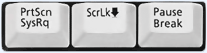
press PrtScn = Windows captures the entire screen and copies it to the (invisible) clipboard.

Where can I find that key?

PrtScn | ScrLk | Pause Look for this group of keys at the upper right of your keyboard. Note: Print Screen (PrtScn) might have been abbreviated differently on your keyboard.

How do I take a screenshot of a single window?

hold down Alt and press PrtScr = Windows captures only the currently active window and copies it to the clipboard.

I guess it’s in the clipboard now. How can I paste it into a document or something?

hold down Ctrl and press V = Windows pastes the screenshot (that is in the clipboard) into a document or image you are currently editing.
  1. Where should I paste it? I just need a (graphics) file. Start “Paint”

  2. Paste
  3. Save

Be Safe on the Internet

                                  How to Stay Safe on the Internet

The internet has become a very popular place these days. But don't forget, just because it is popular doesn't mean it is safe. Even with all the regulations around the internet people can still lie. Below are some ways to keep yourself safe.

Never give out personal information, such as your name, home address, phone number, the name of your school, pictures, credit card numbers, or the names of your parents without permission from your parents.
Never meet in person with someone you met online.
Never give out your password to anyone.
Use a gender neutral username in chat rooms so you are less likely to receive pornographic material or other forms of harassment. If you do receive pornographic material, report it to your local police department. The Internet is not very private anymore. The world gets smaller as Facebook and Google continue to grow. To see for yourself, try "Googling" yourself . What you find is what everyone else finds. If you find your unwanted information online, double check all of your privacy settings for online profiles. Never open, forward, or respond to e-mails with pornographic or other inappropriate material.

Tuesday, 18 February 2014

Challenges of using Microsoft Word

Microsoft word is going to be very difficult to learn how to use. There are lots of different buttons and settings one can use and it is very difficult to try and memorize what button does what. It is also difficult to try and find out what you are looking for. There are some settings on Microsoft Word that I didn't even know existed. It will also be hard to learn to use Microsoft Word because I get headaches when I look at a computer screen for too long especially if I am trying to figure something out. As uncomfortable as it may be to learn this, it will be wonderful knowing how to use it. It will be useful when trying to do school or other projects to know how to use Microsoft Word.

What is a Blog?

A blog is a way for people to express their thoughts and ideas about something. It also helps people to advertise things or to share experiences and expertise, to speak up about an issue they care about, to become more involved with hobbies and passions, to be part of a community,advance my career or start a career in writing.
A blog is a type of website that is updated regularly with new content. Most blogs contain short, informal articles called blog posts. These posts usually contain some combination of text, photos, videos, and other media. At its core, a blog is just a space on the web that you can create to record and express your opinions. From what you hear on the news, you might think that bloggers are all a certain type of people— all very young, politically-inclined, and tech-savvy. Or maybe you've heard about bloggers who've written about amazing experiences or ambitious projects, then turned their blogs into best-selling books. While some bloggers do fit these descriptions, the majority of bloggers don't. In fact, there's no "average" blogger— blogs are written by people of all ages and backgrounds, from styles of life. Experiences and interests. No matter what their main reason for blogging is, most bloggers have at least one thing in common: they're passionate enough about a topic to write about it over and over again, usually for free. If there's a subject you care deeply about, you might enjoy blogging about it. When you have your own blog, you have unlimited space and freedom to express your opinions and discuss the things that you care about with others. A blog can be about literally anything. There are people blogging about every topic imaginable, from their political views to their pets. Think of any interest or hobby, no matter how unusual or specialized— there's bound to be a whole community of blogs devoted to discussing it. Although it's impossible to list all of the subjects people blog about, there are certain topics that are commonly covered.

Tuesday, 28 January 2014

1. I currently use computers when I have to for school projects like typing stuff or looking up information or for facebook and sometimes youtube.

2.  I would rate my knowledge of computers beginer. I don't know how to do most stuff on computers. There are only a few things I can do. I am the slowest typer in the world.